

- Final response: Evaluate the agent’s final response.
- Trajectory: Evaluate whether the agent took the expected path (e.g., of tool calls) to arrive at the final answer.
- Single step: Evaluate any agent step in isolation (e.g., whether it selects the appropriate first tool for a given step).
Setup
Configure the environment
Let’s install the required dependencies:pip install -U langgraph "langchain[openai]"
uv add langgraph "langchain[openai]"
import getpass
import os

def _set_env(var: str) -> None:
    if not os.environ.get(var):
        os.environ[var] = getpass.getpass(f"Set {var}: ")

os.environ["LANGSMITH_TRACING"] = "true"
_set_env("LANGSMITH_API_KEY")
_set_env("OPENAI_API_KEY")
Download the database
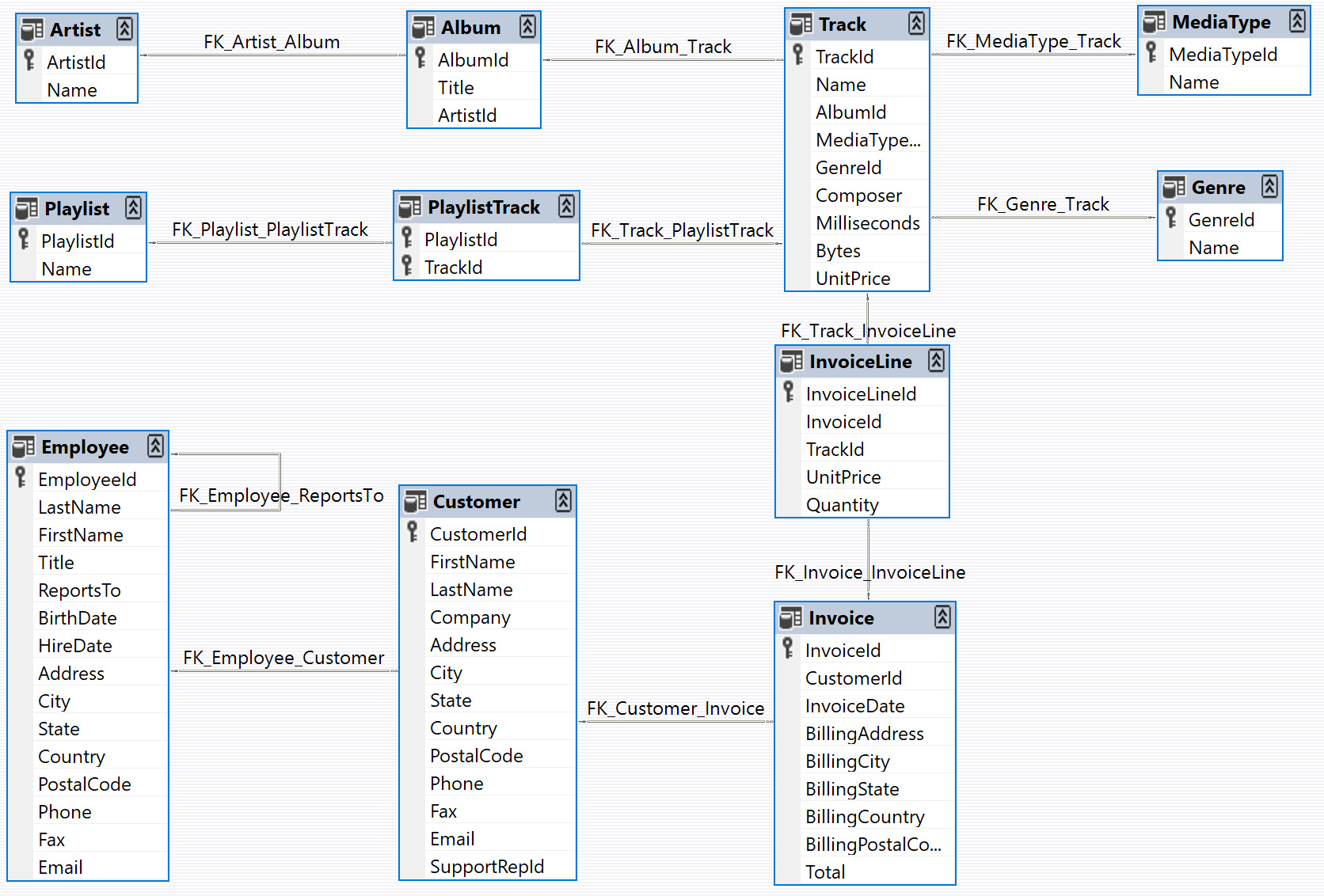
We will create a SQLite database for this tutorial. SQLite is a lightweight database that is easy to set up and use. We will load thechinook database, which is a sample database that represents a digital media store. For more information, see Chinook sample database.
For convenience, we have hosted the database in a public GCS bucket:
import requests

url = "https://storage.googleapis.com/benchmarks-artifacts/chinook/Chinook.db"
response = requests.get(url)

if response.status_code == 200:
    # Open a local file in binary write mode
    with open("chinook.db", "wb") as file:
        # Write the content of the response (the file) to the local file
        file.write(response.content)
    print("File downloaded and saved as Chinook.db")
else:
    print(f"Failed to download the file. Status code: {response.status_code}")
import sqlite3
# ... database connection and query code
[(1, 'AC/DC'), (2, 'Accept'), (3, 'Aerosmith'), (4, 'Alanis Morissette'), (5, 'Alice In Chains'), (6, 'Antônio Carlos Jobim'), (7, 'Apocalyptica'), (8, 'Audioslave'), (9, 'BackBeat'), (10, 'Billy Cobham')]
Define the customer support agent
We’ll create a LangGraph agent with limited access to our database. For demo purposes, our agent will support two basic types of requests:- Lookup: The customer can look up song titles, artist names, and albums based on other identifying information. For example: “What songs do you have by Jimi Hendrix?”
- Refund: The customer can request a refund on their past purchases. For example: “My name is Claude Shannon and I’d like a refund on a purchase I made last week, could you help me?”
Refund agent
Let’s build the refund processing agent. This agent needs to:- Find the customer’s purchase records in the database
- Delete the relevant Invoice and InvoiceLine records to process the refund
- A function to execute the refund by deleting records
- A function to look up a customer’s purchase history
import sqlite3

def _refund(invoice_id: int | None, invoice_line_ids: list[int] | None, mock: bool = False) -> float:
    ...

def _lookup( ...
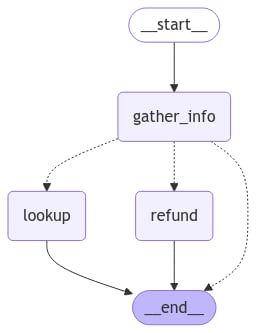
- Extract customer and purchase information from the conversation
-
Route the request to one of three paths:
- Refund path: If we have sufficient purchase details (Invoice ID or Invoice Line IDs) to process a refund
- Lookup path: If we have enough customer information (name and phone) to search their purchase history
- Response path: If we need more information, respond to the user requesting the specific details needed
- The conversation history (messages between user and agent)
- All customer and purchase information extracted from the conversation
- The next message to send to the user (followup text)
from typing import Literal
import json

from langchain.chat_models import init_chat_model
from langchain_core.runnables import RunnableConfig
from langgraph.graph import END, StateGraph
from langgraph.graph.message import AnyMessage, add_messages
from langgraph.types import Command, interrupt
from tabulate import tabulate
from typing_extensions import Annotated, TypedDict

# Graph state.
class State(TypedDict):
    """Agent state."""
    messages: Annotated[list[AnyMessage], add_messages]
    followup: str | None

    invoice_id: int | None
    invoice_line_ids: list[int] | None
    customer_first_name: str | None
    customer_last_name: str | None
    customer_phone: str | None
    track_name: str | None
    album_title: str | None
    artist_name: str | None
    purchase_date_iso_8601: str | None

# Instructions for extracting the user/purchase info from the conversation.
gather_info_instructions = """You are managing an online music store that sells song tracks. \
Customers can buy multiple tracks at a time and these purchases are recorded in a database as \
an Invoice per purchase and an associated set of Invoice Lines for each purchased track.

Your task is to help customers who would like a refund for one or more of the tracks they've \
purchased. In order for you to be able refund them, the customer must specify the Invoice ID \
to get a refund on all the tracks they bought in a single transaction, or one or more Invoice \
Line IDs if they would like refunds on individual tracks.

Often a user will not know the specific Invoice ID(s) or Invoice Line ID(s) for which they \
would like a refund. In this case you can help them look up their invoices by asking them to \
specify:
- Required: Their first name, last name, and phone number.
- Optionally: The track name, artist name, album name, or purchase date.

If the customer has not specified the required information (either Invoice/Invoice Line IDs \
or first name, last name, phone) then please ask them to specify it."""

# Extraction schema, mirrors the graph state.
class PurchaseInformation(TypedDict):
    """All of the known information about the invoice / invoice lines the customer would like refunded. Do not make up values, leave fields as null if you don't know their value."""

    invoice_id: int | None
    invoice_line_ids: list[int] | None
    customer_first_name: str | None
    customer_last_name: str | None
    customer_phone: str | None
    track_name: str | None
    album_title: str | None
    artist_name: str | None
    purchase_date_iso_8601: str | None
    followup: Annotated[
        str | None,
        ...,
        "If the user hasn't enough identifying information, please tell them what the required information is and ask them to specify it.",
    ]

# Model for performing extraction.
info_llm = init_chat_model("gpt-5.4-mini").with_structured_output(
    PurchaseInformation, method="json_schema", include_raw=True
)

# Graph node for extracting user info and routing to lookup/refund/END.
async def gather_info(state: State) -> Command[Literal["lookup", "refund", END]]:
    info = await info_llm.ainvoke(
        [
            {"role": "system", "content": gather_info_instructions},
            *state["messages"],
        ]
    )
    parsed = info["parsed"]
    if any(parsed[k] for k in ("invoice_id", "invoice_line_ids")):
        goto = "refund"
    elif all(
        parsed[k]
        for k in ("customer_first_name", "customer_last_name", "customer_phone")
    ):
        goto = "lookup"
    else:
        goto = END
    update = {"messages": [info["raw"]], **parsed}
    return Command(update=update, goto=goto)

# Graph node for executing the refund.
# Note that here we inspect the runtime config for an "env" variable.
# If "env" is set to "test", then we don't actually delete any rows from our database.
# This will become important when we're running our evaluations.
def refund(state: State, config: RunnableConfig) -> dict:
    # Whether to mock the deletion. True if the configurable var 'env' is set to 'test'.
    mock = config.get("configurable", {}).get("env", "prod") == "test"
    refunded = _refund(
        invoice_id=state["invoice_id"], invoice_line_ids=state["invoice_line_ids"], mock=mock
    )
    response = f"You have been refunded a total of: ${refunded:.2f}. Is there anything else I can help with?"
    return {
        "messages": [{"role": "assistant", "content": response}],
        "followup": response,
    }

# Graph node for looking up the users purchases
def lookup(state: State) -> dict:
    args = (
        state[k]
        for k in (
            "customer_first_name",
            "customer_last_name",
            "customer_phone",
            "track_name",
            "album_title",
            "artist_name",
            "purchase_date_iso_8601",
        )
    )
    results = _lookup(*args)
    if not results:
        response = "We did not find any purchases associated with the information you've provided. Are you sure you've entered all of your information correctly?"
        followup = response
    else:
        response = f"Which of the following purchases would you like to be refunded for?\n\n```json{json.dumps(results, indent=2)}\n```"
        followup = f"Which of the following purchases would you like to be refunded for?\n\n{tabulate(results, headers='keys')}"
    return {
        "messages": [{"role": "assistant", "content": response}],
        "followup": followup,
        "invoice_line_ids": [res["invoice_line_id"] for res in results],
    }

# Building our graph
graph_builder = StateGraph(State)

graph_builder.add_node(gather_info)
graph_builder.add_node(refund)
graph_builder.add_node(lookup)

graph_builder.set_entry_point("gather_info")
graph_builder.add_edge("lookup", END)
graph_builder.add_edge("refund", END)

refund_graph = graph_builder.compile()
# Assumes you're in an interactive Python environmentfrom IPython.display import Image, display ...
Lookup agent
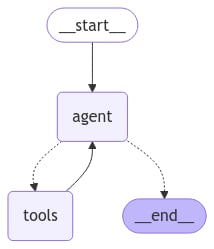
For the lookup (i.e. question-answering) agent, we’ll use a simple ReACT architecture and give the agent tools for looking up track names, artist names, and album names based on various filters. For example, you can look up albums by a particular artist, artists who released songs with a specific name, etc.from langchain.embeddings import init_embeddings
from langchain.tools import tool
from langchain_core.vectorstores import InMemoryVectorStore
from langchain.agents import create_agent
# Our SQL queries will only work if we filter on the exact string values that are in the DB.
# To ensure this, we'll create vectorstore indexes for all of the artists, tracks and albums
# ahead of time and use those to disambiguate the user input. E.g. if a user searches for
# songs by "prince" and our DB records the artist as "Prince", ideally when we query our
# artist vectorstore for "prince" we'll get back the value "Prince", which we can then
# use in our SQL queries.
def index_fields() -> tuple[InMemoryVectorStore, InMemoryVectorStore, InMemoryVectorStore]: ...
track_store, artist_store, album_store = index_fields()
# Agent tools
@tool
def lookup_track( ...
@tool
def lookup_album( ...
@tool
def lookup_artist( ...
# Agent model
qa_llm = init_chat_model("claude-sonnet-4-6")
# The prebuilt ReACT agent only expects State to have a 'messages' key, so the
# state we defined for the refund agent can also be passed to our lookup agent.
qa_graph = create_agent(qa_llm, tools=[lookup_track, lookup_artist, lookup_album])
display(Image(qa_graph.get_graph(xray=True).draw_mermaid_png()))
Parent agent
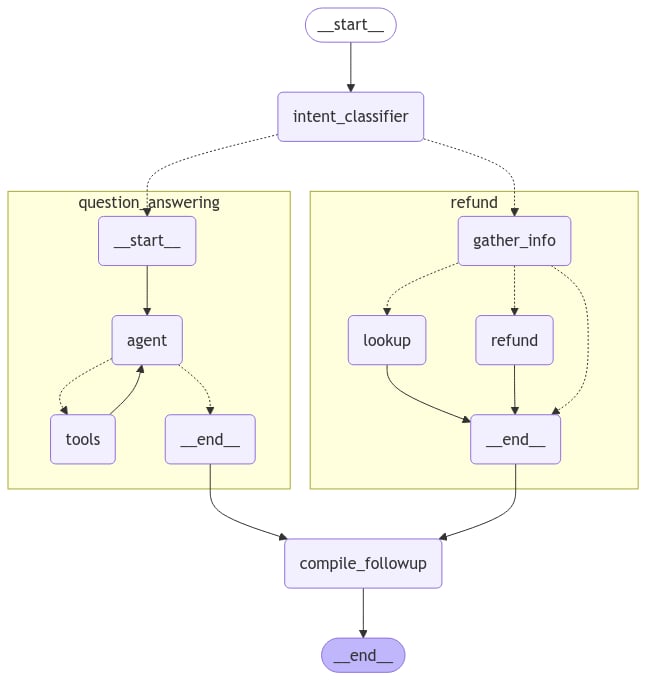
Now let’s define a parent agent that combines our two task-specific agents. The only job of the parent agent is to route to one of the sub-agents by classifying the user’s current intent, and to compile the output into a followup message.# Schema for routing user intent.
# We'll use structured output to enforce that the model returns only
# the desired output.
class UserIntent(TypedDict):
"""The user's current intent in the conversation"""
intent: Literal["refund", "question_answering"]
# Routing model with structured output
router_llm = init_chat_model("gpt-5.4-mini").with_structured_output(
UserIntent, method="json_schema", strict=True
)
# Instructions for routing.
route_instructions = """You are managing an online music store that sells song tracks. \
You can help customers in two types of ways: (1) answering general questions about \
tracks sold at your store, (2) helping them get a refund on a purhcase they made at your store.
Based on the following conversation, determine if the user is currently seeking general \
information about song tracks or if they are trying to refund a specific purchase.
Return 'refund' if they are trying to get a refund and 'question_answering' if they are \
asking a general music question. Do NOT return anything else. Do NOT try to respond to \
the user.
"""
# Node for routing.
async def intent_classifier(
state: State,
) -> Command[Literal["refund_agent", "question_answering_agent"]]:
response = router_llm.invoke(
[{"role": "system", "content": route_instructions}, *state["messages"]]
)
return Command(goto=response["intent"] + "_agent")
# Node for making sure the 'followup' key is set before our agent run completes.
def compile_followup(state: State) -> dict:
"""Set the followup to be the last message if it hasn't explicitly been set."""
if not state.get("followup"):
return {"followup": state["messages"][-1].content}
return {}
# Agent definition
graph_builder = StateGraph(State)
graph_builder.add_node(intent_classifier)
# Since all of our subagents have compatible state,
# we can add them as nodes directly.
graph_builder.add_node("refund_agent", refund_graph)
graph_builder.add_node("question_answering_agent", qa_graph)
graph_builder.add_node(compile_followup)
graph_builder.set_entry_point("intent_classifier")
graph_builder.add_edge("refund_agent", "compile_followup")
graph_builder.add_edge("question_answering_agent", "compile_followup")
graph_builder.add_edge("compile_followup", END)
graph = graph_builder.compile()
display(Image(graph.get_graph().draw_mermaid_png()))
Try it out
Let’s give our custom support agent a whirl!state = await graph.ainvoke(
{"messages": [{"role": "user", "content": "what james brown songs do you have"}]}
)
print(state["followup"])
I found 20 James Brown songs in the database, all from the album "Sex Machine". Here they are: ...
state = await graph.ainvoke({"messages": [
{
"role": "user",
"content": "my name is Aaron Mitchell and my number is +1 (204) 452-6452. I bought some songs by Led Zeppelin that i'd like refunded",
}
]})
print(state["followup"])
Which of the following purchases would you like to be refunded for? ...
Evaluations
Now that we’ve got a testable version of our agent, let’s run some evaluations. Agent evaluation can focus on at least 3 things:- Final response: The inputs are a prompt and an optional list of tools. The output is the final agent response.
- Trajectory: As before, the inputs are a prompt and an optional list of tools. The output is the list of tool calls
- Single step: As before, the inputs are a prompt and an optional list of tools. The output is the tool call.
Final response evaluator
First, let’s create a dataset that evaluates end-to-end performance of the agent. For simplicity we’ll use the same dataset for final response and trajectory evaluation, so we’ll add both ground-truth responses and trajectories for each example question. We’ll cover the trajectories in the next section.from langsmith import Client
client = Client()
# Create a dataset
examples = [
{
"inputs": {
"question": "How many songs do you have by James Brown",
},
"outputs": {
"response": "We have 20 songs by James Brown",
"trajectory": ["question_answering_agent", "lookup_track"]
}
},
{
"inputs": {
"question": "My name is Aaron Mitchell and I'd like a refund.",
},
"outputs": {
"response": "I need some more information to help you with the refund. Please specify your phone number, the invoice ID, or the line item IDs for the purchase you'd like refunded.",
"trajectory": ["refund_agent"],
}
},
{
"inputs": {
"question": "My name is Aaron Mitchell and I'd like a refund on my Led Zeppelin purchases. My number is +1 (204) 452-6452",
},
"outputs": {
"response": 'Which of the following purchases would you like to be refunded for?\n\n invoice_line_id track_name artist_name purchase_date quantity_purchased price_per_unit\n----------------- -------------------------------- ------------- ------------------- -------------------- ----------------\n 267 How Many More Times Led Zeppelin 2009-08-06 00:00:00 1 0.99\n 268 What Is And What Should Never Be Led Zeppelin 2009-08-06 00:00:00 1 0.99',
"trajectory": ["refund_agent", "lookup"],
},
},
{
"inputs": {
"question": "Who recorded Wish You Were Here again? What other albums of there's do you have?",
},
"outputs": {
"response": "Wish You Were Here is an album by Pink Floyd",
"trajectory": ["question_answering_agent", "lookup_album"],
},
},
{
"inputs": {
"question": "I want a full refund for invoice 237",
},
"outputs": {
"response": "You have been refunded $0.99.",
"trajectory": ["refund_agent", "refund"],
}
},
]
dataset_name = "Chinook Customer Service Bot: E2E"
if not client.has_dataset(dataset_name=dataset_name):
dataset = client.create_dataset(dataset_name=dataset_name)
client.create_examples(
dataset_id=dataset.id,
examples=examples
)
# LLM-as-judge instructions
grader_instructions = """You are a teacher grading a quiz.
You will be given a QUESTION, the GROUND TRUTH (correct) RESPONSE, and the STUDENT RESPONSE.
Here is the grade criteria to follow:
(1) Grade the student responses based ONLY on their factual accuracy relative to the ground truth answer.
(2) Ensure that the student response does not contain any conflicting statements.
(3) It is OK if the student response contains more information than the ground truth response, as long as it is factually accurate relative to the ground truth response.
Correctness:
True means that the student's response meets all of the criteria.
False means that the student's response does not meet all of the criteria.
Explain your reasoning in a step-by-step manner to ensure your reasoning and conclusion are correct."""
# LLM-as-judge output schema
class Grade(TypedDict):
"""Compare the expected and actual answers and grade the actual answer."""
reasoning: Annotated[str, ..., "Explain your reasoning for whether the actual response is correct or not."]
is_correct: Annotated[bool, ..., "True if the student response is mostly or exactly correct, otherwise False."]
# Judge LLM
grader_llm = init_chat_model("gpt-5.4-mini", temperature=0).with_structured_output(Grade, method="json_schema", strict=True)
# Evaluator function
async def final_answer_correct(inputs: dict, outputs: dict, reference_outputs: dict) -> bool:
"""Evaluate if the final response is equivalent to reference response."""
# Note that we assume the outputs has a 'response' dictionary. We'll need to make sure
# that the target function we define includes this key.
user = f"""QUESTION: {inputs['question']}
GROUND TRUTH RESPONSE: {reference_outputs['response']}
STUDENT RESPONSE: {outputs['response']}"""
grade = await grader_llm.ainvoke([{"role": "system", "content": grader_instructions}, {"role": "user", "content": user}])
return grade["is_correct"]
config={"env": "test"}, we would mock out the refunds without actually updating the DB. We’ll use this configurable variable in our target run_graph method when invoking our graph:
# Target function
async def run_graph(inputs: dict) -> dict:
"""Run graph and track the trajectory it takes along with the final response."""
result = await graph.ainvoke({"messages": [
{ "role": "user", "content": inputs['question']},
]}, config={"env": "test"})
return {"response": result["followup"]}
# Evaluation job and results
experiment_results = await client.aevaluate(
run_graph,
data=dataset_name,
evaluators=[final_answer_correct],
experiment_prefix="sql-agent-gpt4o-e2e",
num_repetitions=1,
max_concurrency=4,
)
experiment_results.to_pandas()
Trajectory evaluator
As agents become more complex, they have more potential points of failure. Rather than using simple pass/fail evaluations, it’s often better to use evaluations that can give partial credit when an agent takes some correct steps, even if it doesn’t reach the right final answer. This is where trajectory evaluations come in. A trajectory evaluation:- Compares the actual sequence of steps the agent took against an expected sequence
- Calculates a score based on how many of the expected steps were completed correctly
def trajectory_subsequence(outputs: dict, reference_outputs: dict) -> float:
"""Check how many of the desired steps the agent took."""
if len(reference_outputs['trajectory']) > len(outputs['trajectory']):
return False
i = j = 0
while i < len(reference_outputs['trajectory']) and j < len(outputs['trajectory']):
if reference_outputs['trajectory'][i] == outputs['trajectory'][j]:
i += 1
j += 1
return i / len(reference_outputs['trajectory'])
async def run_graph(inputs: dict) -> dict:
"""Run graph and track the trajectory it takes along with the final response."""
trajectory = []
# Set subgraph=True to stream events from subgraphs of the main graph: https://langchain-ai.github.io/langgraph/how-tos/streaming-subgraphs/
# Set stream_mode="debug" to stream all possible events: https://langchain-ai.github.io/langgra/langsmith/observability-concepts/streaming
async for namespace, chunk in graph.astream({"messages": [
{
"role": "user",
"content": inputs['question'],
}
]}, subgraphs=True, stream_mode="debug"):
# Event type for entering a node
if chunk['type'] == 'task':
# Record the node name
trajectory.append(chunk['payload']['name'])
# Given how we defined our dataset, we also need to track when specific tools are
# called by our question answering ReACT agent. These tool calls can be found
# when the ToolsNode (named "tools") is invoked by looking at the AIMessage.tool_calls
# of the latest input message.
if chunk['payload']['name'] == 'tools' and chunk['type'] == 'task':
for tc in chunk['payload']['input']['messages'][-1].tool_calls:
trajectory.append(tc['name'])
return {"trajectory": trajectory}
experiment_results = await client.aevaluate(
run_graph,
data=dataset_name,
evaluators=[trajectory_subsequence],
experiment_prefix="sql-agent-gpt4o-trajectory",
num_repetitions=1,
max_concurrency=4,
)
experiment_results.to_pandas()
Single step evaluators
While end-to-end tests give you the most signal about your agents performance, for the sake of debugging and iterating on your agent it can be helpful to pinpoint specific steps that are difficult and evaluate them directly. In our case, a crucial part of our agent is that it routes the user’s intention correctly into either the “refund” path or the “question answering” path. Let’s create a dataset and run some evaluations to directly stress test this one component.# Create dataset
examples = [
{
"inputs": {"messages": [{"role": "user", "content": "i bought some tracks recently and i dont like them"}]},
"outputs": {"route": "refund_agent"},
},
{
"inputs": {"messages": [{"role": "user", "content": "I was thinking of purchasing some Rolling Stones tunes, any recommendations?"}]},
"outputs": {"route": "question_answering_agent"},
},
{
"inputs": {"messages": [{"role": "user", "content": "i want a refund on purchase 237"}, {"role": "assistant", "content": "I've refunded you a total of $1.98. How else can I help you today?"}, {"role": "user", "content": "did prince release any albums in 2000?"}]},
"outputs": {"route": "question_answering_agent"},
},
{
"inputs": {"messages": [{"role": "user", "content": "i purchased a cover of Yesterday recently but can't remember who it was by, which versions of it do you have?"}]},
"outputs": {"route": "question_answering_agent"},
},
]
dataset_name = "Chinook Customer Service Bot: Intent Classifier"
if not client.has_dataset(dataset_name=dataset_name):
dataset = client.create_dataset(dataset_name=dataset_name)
client.create_examples(
dataset_id=dataset.id,
examples=examples
)
# Evaluator
def correct(outputs: dict, reference_outputs: dict) -> bool:
"""Check if the agent chose the correct route."""
return outputs["route"] == reference_outputs["route"]
# Target function for running the relevant step
async def run_intent_classifier(inputs: dict) -> dict:
# Note that we can access and run the intent_classifier node of our graph directly.
command = await graph.nodes['intent_classifier'].ainvoke(inputs)
return {"route": command.goto}
# Run evaluation
experiment_results = await client.aevaluate(
run_intent_classifier,
data=dataset_name,
evaluators=[correct],
experiment_prefix="sql-agent-gpt4o-intent-classifier",
max_concurrency=4,
)
Reference code
Here’s a consolidated script with all the above code:Reference code
Reference code
import json
import sqlite3
from typing import Literal
from langchain.chat_models import init_chat_model
from langchain.embeddings import init_embeddings
from langchain_core.runnables import RunnableConfig
from langchain.tools import tool
from langchain_core.vectorstores import InMemoryVectorStore
from langgraph.graph import END, StateGraph
from langgraph.graph.message import AnyMessage, add_messages
from langchain.agents import create_agent
from langgraph.types import Command, interrupt
from langsmith import Client
import requests
from tabulate import tabulate
from typing_extensions import Annotated, TypedDict
url = "https://storage.googleapis.com/benchmarks-artifacts/chinook/Chinook.db"
response = requests.get(url)
if response.status_code == 200:
# Open a local file in binary write mode
with open("chinook.db", "wb") as file:
# Write the content of the response (the file) to the local file
file.write(response.content)
print("File downloaded and saved as Chinook.db")
else:
print(f"Failed to download the file. Status code: {response.status_code}")
def _refund(
invoice_id: int | None, invoice_line_ids: list[int] | None, mock: bool = False
) -> float:
"""Given an Invoice ID and/or Invoice Line IDs, delete the relevant Invoice/InvoiceLine records in the Chinook DB.
Args:
invoice_id: The Invoice to delete.
invoice_line_ids: The Invoice Lines to delete.
mock: If True, do not actually delete the specified Invoice/Invoice Lines. Used for testing purposes.
Returns:
float: The total dollar amount that was deleted (or mock deleted).
"""
if invoice_id is None and invoice_line_ids is None:
return 0.0
# Connect to the Chinook database
conn = sqlite3.connect("chinook.db")
cursor = conn.cursor()
total_refund = 0.0
try:
# If invoice_id is provided, delete entire invoice and its lines
if invoice_id is not None:
# First get the total amount for the invoice
cursor.execute(
"""
SELECT Total
FROM Invoice
WHERE InvoiceId = ?
""",
(invoice_id,),
)
result = cursor.fetchone()
if result:
total_refund += result[0]
# Delete invoice lines first (due to foreign key constraints)
if not mock:
cursor.execute(
"""
DELETE FROM InvoiceLine
WHERE InvoiceId = ?
""",
(invoice_id,),
)
# Then delete the invoice
cursor.execute(
"""
DELETE FROM Invoice
WHERE InvoiceId = ?
""",
(invoice_id,),
)
# If specific invoice lines are provided
if invoice_line_ids is not None:
# Get the total amount for the specified invoice lines
placeholders = ",".join(["?" for _ in invoice_line_ids])
cursor.execute(
f"""
SELECT SUM(UnitPrice * Quantity)
FROM InvoiceLine
WHERE InvoiceLineId IN ({placeholders})
""",
invoice_line_ids,
)
result = cursor.fetchone()
if result and result[0]:
total_refund += result[0]
if not mock:
# Delete the specified invoice lines
cursor.execute(
f"""
DELETE FROM InvoiceLine
WHERE InvoiceLineId IN ({placeholders})
""",
invoice_line_ids,
)
# Commit the changes
conn.commit()
except sqlite3.Error as e:
# Roll back in case of error
conn.rollback()
raise e
finally:
# Close the connection
conn.close()
return float(total_refund)
def _lookup(
customer_first_name: str,
customer_last_name: str,
customer_phone: str,
track_name: str | None,
album_title: str | None,
artist_name: str | None,
purchase_date_iso_8601: str | None,
) -> list[dict]:
"""Find all of the Invoice Line IDs in the Chinook DB for the given filters.
Returns:
a list of dictionaries that contain keys: {
'invoice_line_id',
'track_name',
'artist_name',
'purchase_date',
'quantity_purchased',
'price_per_unit'
}
"""
# Connect to the database
conn = sqlite3.connect("chinook.db")
cursor = conn.cursor()
# Base query joining all necessary tables
query = """
SELECT
il.InvoiceLineId,
t.Name as track_name,
art.Name as artist_name,
i.InvoiceDate as purchase_date,
il.Quantity as quantity_purchased,
il.UnitPrice as price_per_unit
FROM InvoiceLine il
JOIN Invoice i ON il.InvoiceId = i.InvoiceId
JOIN Customer c ON i.CustomerId = c.CustomerId
JOIN Track t ON il.TrackId = t.TrackId
JOIN Album alb ON t.AlbumId = alb.AlbumId
JOIN Artist art ON alb.ArtistId = art.ArtistId
WHERE c.FirstName = ?
AND c.LastName = ?
AND c.Phone = ?
"""
# Parameters for the query
params = [customer_first_name, customer_last_name, customer_phone]
# Add optional filters
if track_name:
query += " AND t.Name = ?"
params.append(track_name)
if album_title:
query += " AND alb.Title = ?"
params.append(album_title)
if artist_name:
query += " AND art.Name = ?"
params.append(artist_name)
if purchase_date_iso_8601:
query += " AND date(i.InvoiceDate) = date(?)"
params.append(purchase_date_iso_8601)
# Execute query
cursor.execute(query, params)
# Fetch results
results = cursor.fetchall()
# Convert results to list of dictionaries
output = []
for row in results:
output.append(
{
"invoice_line_id": row[0],
"track_name": row[1],
"artist_name": row[2],
"purchase_date": row[3],
"quantity_purchased": row[4],
"price_per_unit": row[5],
}
)
# Close connection
conn.close()
return output
# Graph state.
class State(TypedDict):
"""Agent state."""
messages: Annotated[list[AnyMessage], add_messages]
followup: str | None
invoice_id: int | None
invoice_line_ids: list[int] | None
customer_first_name: str | None
customer_last_name: str | None
customer_phone: str | None
track_name: str | None
album_title: str | None
artist_name: str | None
purchase_date_iso_8601: str | None
# Instructions for extracting the user/purchase info from the conversation.
gather_info_instructions = """You are managing an online music store that sells song tracks. \
Customers can buy multiple tracks at a time and these purchases are recorded in a database as \
an Invoice per purchase and an associated set of Invoice Lines for each purchased track.
Your task is to help customers who would like a refund for one or more of the tracks they've \
purchased. In order for you to be able refund them, the customer must specify the Invoice ID \
to get a refund on all the tracks they bought in a single transaction, or one or more Invoice \
Line IDs if they would like refunds on individual tracks.
Often a user will not know the specific Invoice ID(s) or Invoice Line ID(s) for which they \
would like a refund. In this case you can help them look up their invoices by asking them to \
specify:
- Required: Their first name, last name, and phone number.
- Optionally: The track name, artist name, album name, or purchase date.
If the customer has not specified the required information (either Invoice/Invoice Line IDs \
or first name, last name, phone) then please ask them to specify it."""
# Extraction schema, mirrors the graph state.
class PurchaseInformation(TypedDict):
"""All of the known information about the invoice / invoice lines the customer would like refunded. Do not make up values, leave fields as null if you don't know their value."""
invoice_id: int | None
invoice_line_ids: list[int] | None
customer_first_name: str | None
customer_last_name: str | None
customer_phone: str | None
track_name: str | None
album_title: str | None
artist_name: str | None
purchase_date_iso_8601: str | None
followup: Annotated[
str | None,
...,
"If the user hasn't enough identifying information, please tell them what the required information is and ask them to specify it.",
]
# Model for performing extraction.
info_llm = init_chat_model("gpt-5.4-mini").with_structured_output(
PurchaseInformation, method="json_schema", include_raw=True
)
# Graph node for extracting user info and routing to lookup/refund/END.
async def gather_info(state: State) -> Command[Literal["lookup", "refund", END]]:
info = await info_llm.ainvoke(
[
{"role": "system", "content": gather_info_instructions},
*state["messages"],
]
)
parsed = info["parsed"]
if any(parsed[k] for k in ("invoice_id", "invoice_line_ids")):
goto = "refund"
elif all(
parsed[k]
for k in ("customer_first_name", "customer_last_name", "customer_phone")
):
goto = "lookup"
else:
goto = END
update = {"messages": [info["raw"]], **parsed}
return Command(update=update, goto=goto)
# Graph node for executing the refund.
# Note that here we inspect the runtime config for an "env" variable.
# If "env" is set to "test", then we don't actually delete any rows from our database.
# This will become important when we're running our evaluations.
def refund(state: State, config: RunnableConfig) -> dict:
# Whether to mock the deletion. True if the configurable var 'env' is set to 'test'.
mock = config.get("configurable", {}).get("env", "prod") == "test"
refunded = _refund(
invoice_id=state["invoice_id"],
invoice_line_ids=state["invoice_line_ids"],
mock=mock,
)
response = f"You have been refunded a total of: ${refunded:.2f}. Is there anything else I can help with?"
return {
"messages": [{"role": "assistant", "content": response}],
"followup": response,
}
# Graph node for looking up the users purchases
def lookup(state: State) -> dict:
args = (
state[k]
for k in (
"customer_first_name",
"customer_last_name",
"customer_phone",
"track_name",
"album_title",
"artist_name",
"purchase_date_iso_8601",
)
)
results = _lookup(*args)
if not results:
response = "We did not find any purchases associated with the information you've provided. Are you sure you've entered all of your information correctly?"
followup = response
else:
response = f"Which of the following purchases would you like to be refunded for?\n\n```json{json.dumps(results, indent=2)}\n```"
followup = f"Which of the following purchases would you like to be refunded for?\n\n{tabulate(results, headers='keys')}"
return {
"messages": [{"role": "assistant", "content": response}],
"followup": followup,
"invoice_line_ids": [res["invoice_line_id"] for res in results],
}
# Building our graph
graph_builder = StateGraph(State)
graph_builder.add_node(gather_info)
graph_builder.add_node(refund)
graph_builder.add_node(lookup)
graph_builder.set_entry_point("gather_info")
graph_builder.add_edge("lookup", END)
graph_builder.add_edge("refund", END)
refund_graph = graph_builder.compile()
# Our SQL queries will only work if we filter on the exact string values that are in the DB.
# To ensure this, we'll create vectorstore indexes for all of the artists, tracks and albums
# ahead of time and use those to disambiguate the user input. E.g. if a user searches for
# songs by "prince" and our DB records the artist as "Prince", ideally when we query our
# artist vectorstore for "prince" we'll get back the value "Prince", which we can then
# use in our SQL queries.
def index_fields() -> (
tuple[InMemoryVectorStore, InMemoryVectorStore, InMemoryVectorStore]
):
"""Create an index for all artists, an index for all albums, and an index for all songs."""
try:
# Connect to the chinook database
conn = sqlite3.connect("chinook.db")
cursor = conn.cursor()
# Fetch all results
tracks = cursor.execute("SELECT Name FROM Track").fetchall()
artists = cursor.execute("SELECT Name FROM Artist").fetchall()
albums = cursor.execute("SELECT Title FROM Album").fetchall()
finally:
# Close the connection
if conn:
conn.close()
embeddings = init_embeddings("openai:text-embedding-3-small")
track_store = InMemoryVectorStore(embeddings)
artist_store = InMemoryVectorStore(embeddings)
album_store = InMemoryVectorStore(embeddings)
track_store.add_texts([t[0] for t in tracks])
artist_store.add_texts([a[0] for a in artists])
album_store.add_texts([a[0] for a in albums])
return track_store, artist_store, album_store
track_store, artist_store, album_store = index_fields()
# Agent tools
@tool
def lookup_track(
track_name: str | None = None,
album_title: str | None = None,
artist_name: str | None = None,
) -> list[dict]:
"""Lookup a track in Chinook DB based on identifying information about.
Returns:
a list of dictionaries per matching track that contain keys {'track_name', 'artist_name', 'album_name'}
"""
conn = sqlite3.connect("chinook.db")
cursor = conn.cursor()
query = """
SELECT DISTINCT t.Name as track_name, ar.Name as artist_name, al.Title as album_name
FROM Track t
JOIN Album al ON t.AlbumId = al.AlbumId
JOIN Artist ar ON al.ArtistId = ar.ArtistId
WHERE 1=1
"""
params = []
if track_name:
track_name = track_store.similarity_search(track_name, k=1)[0].page_content
query += " AND t.Name LIKE ?"
params.append(f"%{track_name}%")
if album_title:
album_title = album_store.similarity_search(album_title, k=1)[0].page_content
query += " AND al.Title LIKE ?"
params.append(f"%{album_title}%")
if artist_name:
artist_name = artist_store.similarity_search(artist_name, k=1)[0].page_content
query += " AND ar.Name LIKE ?"
params.append(f"%{artist_name}%")
cursor.execute(query, params)
results = cursor.fetchall()
tracks = [
{"track_name": row[0], "artist_name": row[1], "album_name": row[2]}
for row in results
]
conn.close()
return tracks
@tool
def lookup_album(
track_name: str | None = None,
album_title: str | None = None,
artist_name: str | None = None,
) -> list[dict]:
"""Lookup an album in Chinook DB based on identifying information about.
Returns:
a list of dictionaries per matching album that contain keys {'album_name', 'artist_name'}
"""
conn = sqlite3.connect("chinook.db")
cursor = conn.cursor()
query = """
SELECT DISTINCT al.Title as album_name, ar.Name as artist_name
FROM Album al
JOIN Artist ar ON al.ArtistId = ar.ArtistId
LEFT JOIN Track t ON t.AlbumId = al.AlbumId
WHERE 1=1
"""
params = []
if track_name:
query += " AND t.Name LIKE ?"
params.append(f"%{track_name}%")
if album_title:
query += " AND al.Title LIKE ?"
params.append(f"%{album_title}%")
if artist_name:
query += " AND ar.Name LIKE ?"
params.append(f"%{artist_name}%")
cursor.execute(query, params)
results = cursor.fetchall()
albums = [{"album_name": row[0], "artist_name": row[1]} for row in results]
conn.close()
return albums
@tool
def lookup_artist(
track_name: str | None = None,
album_title: str | None = None,
artist_name: str | None = None,
) -> list[str]:
"""Lookup an album in Chinook DB based on identifying information about.
Returns:
a list of matching artist names
"""
conn = sqlite3.connect("chinook.db")
cursor = conn.cursor()
query = """
SELECT DISTINCT ar.Name as artist_name
FROM Artist ar
LEFT JOIN Album al ON al.ArtistId = ar.ArtistId
LEFT JOIN Track t ON t.AlbumId = al.AlbumId
WHERE 1=1
"""
params = []
if track_name:
query += " AND t.Name LIKE ?"
params.append(f"%{track_name}%")
if album_title:
query += " AND al.Title LIKE ?"
params.append(f"%{album_title}%")
if artist_name:
query += " AND ar.Name LIKE ?"
params.append(f"%{artist_name}%")
cursor.execute(query, params)
results = cursor.fetchall()
artists = [row[0] for row in results]
conn.close()
return artists
# Agent model
qa_llm = init_chat_model("claude-sonnet-4-6")
# The prebuilt ReACT agent only expects State to have a 'messages' key, so the
# state we defined for the refund agent can also be passed to our lookup agent.
qa_graph = create_agent(qa_llm, [lookup_track, lookup_artist, lookup_album])
# Schema for routing user intent.
# We'll use structured output to enforce that the model returns only
# the desired output.
class UserIntent(TypedDict):
    """The user's current intent in the conversation"""

    intent: Literal["refund", "question_answering"]

# Routing model with structured output
router_llm = init_chat_model("gpt-5.4-mini").with_structured_output(
    UserIntent, method="json_schema", strict=True
)

# Instructions for routing.
route_instructions = """You are managing an online music store that sells song tracks. \
You can help customers in two types of ways: (1) answering general questions about \
tracks sold at your store, (2) helping them get a refund on a purhcase they made at your store.

Based on the following conversation, determine if the user is currently seeking general \
information about song tracks or if they are trying to refund a specific purchase.

Return 'refund' if they are trying to get a refund and 'question_answering' if they are \
asking a general music question. Do NOT return anything else. Do NOT try to respond to \
the user.
"""

# Node for routing.
async def intent_classifier(
    state: State,
) -> Command[Literal["refund_agent", "question_answering_agent"]]:
    response = router_llm.invoke(
        [{"role": "system", "content": route_instructions}, *state["messages"]]
    )
    return Command(goto=response["intent"] + "_agent")

# Node for making sure the 'followup' key is set before our agent run completes.
def compile_followup(state: State) -> dict:
    """Set the followup to be the last message if it hasn't explicitly been set."""
    if not state.get("followup"):
        return {"followup": state["messages"][-1].content}
    return {}

# Agent definition
graph_builder = StateGraph(State)
graph_builder.add_node(intent_classifier)
# Since all of our subagents have compatible state,
# we can add them as nodes directly.
graph_builder.add_node("refund_agent", refund_graph)
graph_builder.add_node("question_answering_agent", qa_graph)
graph_builder.add_node(compile_followup)

graph_builder.set_entry_point("intent_classifier")
graph_builder.add_edge("refund_agent", "compile_followup")
graph_builder.add_edge("question_answering_agent", "compile_followup")
graph_builder.add_edge("compile_followup", END)

graph = graph_builder.compile()
client = Client()
# Create a dataset
examples = [
{
"inputs": {
"question": "How many songs do you have by James Brown"
},
"outputs": {
"response": "We have 20 songs by James Brown",
"trajectory": ["question_answering_agent", "lookup_tracks"]
},
},
{
"inputs": {
"question": "My name is Aaron Mitchell and I'd like a refund.",
},
"outputs": {
"response": "I need some more information to help you with the refund. Please specify your phone number, the invoice ID, or the line item IDs for the purchase you'd like refunded.",
"trajectory": ["refund_agent"],
}
},
{
"inputs": {
"question": "My name is Aaron Mitchell and I'd like a refund on my Led Zeppelin purchases. My number is +1 (204) 452-6452",
},
"outputs": {
"response": "Which of the following purchases would you like to be refunded for?\n\n invoice_line_id track_name artist_name purchase_date quantity_purchased price_per_unit\n----------------- -------------------------------- ------------- ------------------- -------------------- ----------------\n 267 How Many More Times Led Zeppelin 2009-08-06 00:00:00 1 0.99\n 268 What Is And What Should Never Be Led Zeppelin 2009-08-06 00:00:00 1 0.99",
"trajectory": ["refund_agent", "lookup"],
},
},
{
"inputs": {
"question": "Who recorded Wish You Were Here again? What other albums of there's do you have?",
},
"outputs": {
"response": "Wish You Were Here is an album by Pink Floyd",
"trajectory": ["question_answering_agent", "lookup_album"],
}
},
{
"inputs": {
"question": "I want a full refund for invoice 237",
},
"outputs": {
"response": "You have been refunded $2.97.",
"trajectory": ["refund_agent", "refund"],
},
},
]
dataset_name = "Chinook Customer Service Bot: E2E"
if not client.has_dataset(dataset_name=dataset_name):
dataset = client.create_dataset(dataset_name=dataset_name)
client.create_examples(
dataset_id=dataset.id,
examples=examples
)
# LLM-as-judge instructions
grader_instructions = """You are a teacher grading a quiz.
You will be given a QUESTION, the GROUND TRUTH (correct) RESPONSE, and the STUDENT RESPONSE.
Here is the grade criteria to follow:
(1) Grade the student responses based ONLY on their factual accuracy relative to the ground truth answer.
(2) Ensure that the student response does not contain any conflicting statements.
(3) It is OK if the student response contains more information than the ground truth response, as long as it is factually accurate relative to the ground truth response.
Correctness:
True means that the student's response meets all of the criteria.
False means that the student's response does not meet all of the criteria.
Explain your reasoning in a step-by-step manner to ensure your reasoning and conclusion are correct."""
# LLM-as-judge output schema
class Grade(TypedDict):
"""Compare the expected and actual answers and grade the actual answer."""
reasoning: Annotated[
str,
...,
"Explain your reasoning for whether the actual response is correct or not.",
]
is_correct: Annotated[
bool,
...,
"True if the student response is mostly or exactly correct, otherwise False.",
]
# Judge LLM
grader_llm = init_chat_model("gpt-5.4-mini", temperature=0).with_structured_output(
Grade, method="json_schema", strict=True
)
# Evaluator function
async def final_answer_correct(
inputs: dict, outputs: dict, reference_outputs: dict
) -> bool:
"""Evaluate if the final response is equivalent to reference response."""
# Note that we assume the outputs has a 'response' dictionary. We'll need to make sure
# that the target function we define includes this key.
user = f"""QUESTION: {inputs['question']}
GROUND TRUTH RESPONSE: {reference_outputs['response']}
STUDENT RESPONSE: {outputs['response']}"""
grade = await grader_llm.ainvoke(
[
{"role": "system", "content": grader_instructions},
{"role": "user", "content": user},
]
)
return grade["is_correct"]
# Target function
async def run_graph(inputs: dict) -> dict:
"""Run graph and track the trajectory it takes along with the final response."""
result = await graph.ainvoke(
{
"messages": [
{"role": "user", "content": inputs["question"]},
]
},
config={"env": "test"},
)
return {"response": result["followup"]}
# Evaluation job and results
experiment_results = await client.aevaluate(
run_graph,
data=dataset_name,
evaluators=[final_answer_correct],
experiment_prefix="sql-agent-gpt4o-e2e",
num_repetitions=1,
max_concurrency=4,
)
experiment_results.to_pandas()
def trajectory_subsequence(outputs: dict, reference_outputs: dict) -> float:
"""Check how many of the desired steps the agent took."""
if len(reference_outputs["trajectory"]) > len(outputs["trajectory"]):
return False
i = j = 0
while i < len(reference_outputs["trajectory"]) and j < len(outputs["trajectory"]):
if reference_outputs["trajectory"][i] == outputs["trajectory"][j]:
i += 1
j += 1
return i / len(reference_outputs["trajectory"])
async def run_graph(inputs: dict) -> dict:
"""Run graph and track the trajectory it takes along with the final response."""
trajectory = []
# Set subgraph=True to stream events from subgraphs of the main graph: https://langchain-ai.github.io/langgraph/how-tos/streaming-subgraphs/
# Set stream_mode="debug" to stream all possible events: https://langchain-ai.github.io/langgra/langsmith/observability-concepts/streaming
async for namespace, chunk in graph.astream(
{
"messages": [
{
"role": "user",
"content": inputs["question"],
}
]
},
subgraphs=True,
stream_mode="debug",
):
# Event type for entering a node
if chunk["type"] == "task":
# Record the node name
trajectory.append(chunk["payload"]["name"])
# Given how we defined our dataset, we also need to track when specific tools are
# called by our question answering ReACT agent. These tool calls can be found
# when the ToolsNode (named "tools") is invoked by looking at the AIMessage.tool_calls
# of the latest input message.
if chunk["payload"]["name"] == "tools" and chunk["type"] == "task":
for tc in chunk["payload"]["input"]["messages"][-1].tool_calls:
trajectory.append(tc["name"])
return {"trajectory": trajectory}
experiment_results = await client.aevaluate(
run_graph,
data=dataset_name,
evaluators=[trajectory_subsequence],
experiment_prefix="sql-agent-gpt4o-trajectory",
num_repetitions=1,
max_concurrency=4,
)
experiment_results.to_pandas()
# Create dataset
examples = [
{
"inputs": {
"messages": [
{
"role": "user",
"content": "i bought some tracks recently and i dont like them",
}
],
}
"outputs": {"route": "refund_agent"},
},
{
"inputs": {
"messages": [
{
"role": "user",
"content": "I was thinking of purchasing some Rolling Stones tunes, any recommendations?",
}
],
},
"outputs": {"route": "question_answering_agent"},
},
{
"inputs": {
"messages": [
{"role": "user", "content": "i want a refund on purchase 237"},
{
"role": "assistant",
"content": "I've refunded you a total of $1.98. How else can I help you today?",
},
{"role": "user", "content": "did prince release any albums in 2000?"},
],
},
"outputs": {"route": "question_answering_agent"},
},
{
"inputs": {
"messages": [
{
"role": "user",
"content": "i purchased a cover of Yesterday recently but can't remember who it was by, which versions of it do you have?",
}
],
},
"outputs": {"route": "question_answering_agent"},
},
]
dataset_name = "Chinook Customer Service Bot: Intent Classifier"
if not client.has_dataset(dataset_name=dataset_name):
dataset = client.create_dataset(dataset_name=dataset_name)
client.create_examples(
dataset_id=dataset.id,
examples=examples,
)
# Evaluator
def correct(outputs: dict, reference_outputs: dict) -> bool:
"""Check if the agent chose the correct route."""
return outputs["route"] == reference_outputs["route"]
# Target function for running the relevant step
async def run_intent_classifier(inputs: dict) -> dict:
# Note that we can access and run the intent_classifier node of our graph directly.
command = await graph.nodes["intent_classifier"].ainvoke(inputs)
return {"route": command.goto}
# Run evaluation
experiment_results = await client.aevaluate(
run_intent_classifier,
data=dataset_name,
evaluators=[correct],
experiment_prefix="sql-agent-gpt4o-intent-classifier",
max_concurrency=4,
)
experiment_results.to_pandas()
Connect these docs to Claude, VSCode, and more via MCP for real-time answers.